Inventory Items
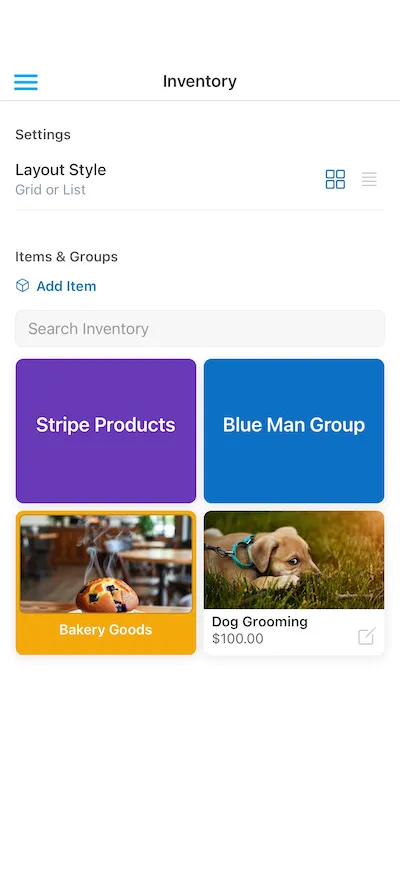
Pre-set Items with Images, Prices, Groups, Instant Search and more.
Save your most common products and services as Inventory Items with a name, price, optional image and optional group. During a sale, switch to the Inventory tab, tap Items to add them to the cart, and adjust quantities instead of keying in every amount by hand.
Stripe Product Sync
Already have products set up in Stripe? Collect automatically pulls them into a dedicated Stripe Products group, including names and images, and keeps them in sync via the backend server.
You can also trigger a manual sync from the Collect Web Dashboard when you make larger catalog changes.
Group Organization
Put items into groups, which you can change or move any time, and give your groups a color for quick recognition. Every group and every item can have an image as well.
Visual and Searchable
Build orders from a visual grid or condensed list, including side‑by‑side layouts on tablets so cashiers can browse Inventory while seeing the live order summary.
Use Search to quickly find Items by name, then tap to add them to the transaction.
Manage From Mobile or Dashboard
Collect User Permissions Required
Create, edit, or delete Items and Groups directly in the mobile app, or manage your full catalog from the Collect Web Dashboard with reordering and Stripe sync controls.
Permissions let you decide who can use Inventory at checkout and who can change the catalog.
Start using Inventory Items today.


Explore More Features
Tap to Pay on iPhone
Turn your iPhone into a mobile credit card reader. No hardware needed.
Tap to Pay on Android
Turn your Android device into a mobile credit card reader. No hardware needed.
Test Mode
Practice without charging real money. Toggle between Test and Live mode.
Card Readers
Compatible with all Stripe Terminal readers and Test Cards.
Global Currency Support
Automatically formats for your currency and region.
Tipping
Just set your Payment Flow to 'Ask'. Customize your tip percentages.
Interac Payments
Full support for Interac Debit in Canada.
Authorize-Only Charges
Reserve funds on a card now and capture them later.