Test Mode
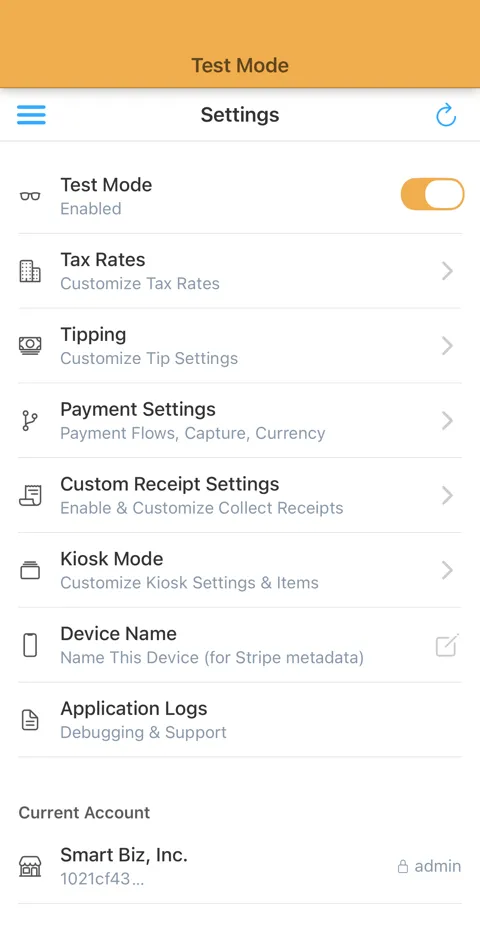
Verify without charging real money.
Collect includes a built-in Test Mode that mirrors your Stripe account’s Test environment. Toggle between Test and Live mode instantly.
In Test Mode, you can enter test numbers manually, simulate a card reader, or get a Stripe Test Card to use test mode with real reader hardware.
Note: You cannot use real cards or card numbers when in Test Mode.
Instructions below
What is Test Mode?
Test Mode allows you to process transactions using Stripe’s test card numbers without charging real money. It’s perfect for:
- Training new employees/volunteers – Practice without risk
- Testing payment flows – Verify your setup before going live
- Checking data, amounts – Compare against the Stripe Dashboard to see what the data look like
How to Enable
- Go to Settings in the Collect app
- Toggle Test Mode on
- The app will display a banner indicating you’re in test mode
Test Card Numbers
Use Stripe’s standard test card numbers or physical Test Card (available in the Stripe Dashboard under ‘Terminal’).
Going Live
When you’re ready, simply toggle Test Mode off in Settings. All real transactions will process through your live Stripe account.
Note: Test mode charges appear in your Stripe Dashboard under the “Test Data” toggle.
Start using Test Mode today.


Explore More Features
Tap to Pay on Android
Turn your Android device into a mobile credit card reader. No hardware needed.
Tap to Pay on iPhone
Turn your iPhone into a mobile credit card reader. No hardware needed.
Collect for Readers
Run Collect as an on-reader app on your S700 or S710. No phone or tablet required.
Contactless Payments
Support for Bluetooth readers like the Stripe Reader M2 and WisePad 3.
Tipping
Just set your Payment Flow to 'Ask'. Customize your tip percentages.
Interac Payments
Full support for Interac Debit in Canada.
Authorize-Only Charges
Reserve funds on a card now and capture them later.
Tax Rates
Import Stripe Tax Rates or create your own.